

If LG violates wire-tapping laws, it’s actually your fault.
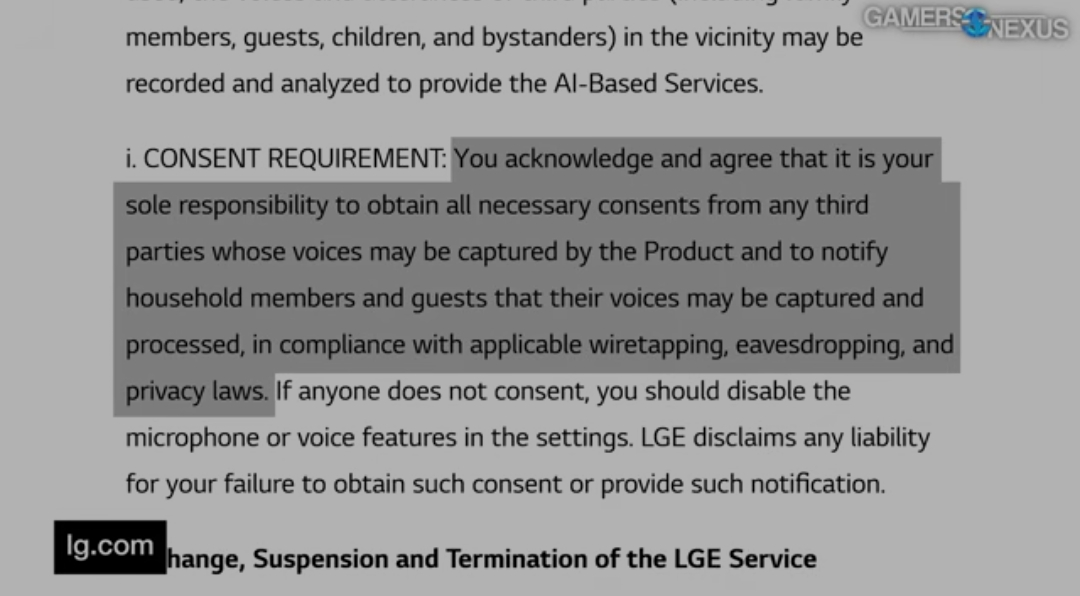
That’s probably only legal in the US.
It’s not legal anywhere. But crime is legal in the US, so good luck getting anything done about it.
But crime is legal in the US
You have to be wealthy for this to apply to you
I’ve seen many a TOS that includes things that are technically unenforceable or otherwise in violation of current law. I guess the companies just like to hedge their bets. Who’s going to stop them, right?
Lawsuits are expensive! If step 1 is half a step back, establishing that a contract is unenforceable and therefore you’re allowed to sue, that effectively adds to their defense.
They’re right You should disable the microphone.
I think there’s some confusion in this thread.
This isn’t just about smart TVs.
LG also retroactively hit dumb TVs and dumb monitors, auto-installing a driver through Windows Update to load adware and who-knows-what-else. Dumb TVs are not safe, in this instance.
I know this because it hit me, just this month.
But how does my “dumb TV” have windows update?
When plugged in, maybe windows recognizes the monitor is LG and it’s an auto download? That was how it seemed outlined in the video.
That’s precisely what it does.
Monitors can transmit their IDs over HDMI/DP, so then Windows update checks against its database and sees there’s a driver for this device.
To reiterate, it doesn’t actually do anything to the monitor though. Just your Windows install. I think the driver is ostensibly there to install a generic color calibration profile, but as you can see that’s just a pretense.
Looks like it’s equally a Windows problem as it is an LG problem. Why the fuck are you automatically installing shit off the internet when peripherals get connected?
Microsoft being Microsoft. In the 90s and 00s, Windows used to auto-launch programs from CDs when you put them in the drive. No check, just looks for an .exe, and silently runs it. Really good way to get a rootkit installed on your machine.
Autoexec makes sense in historical context.
If you were a PC user in the 90s and put an application disk in your PC, you did that because you wanted to run what was on it.
You were going to run it. All autoexec did was save you some clicks.
CD burners weren’t a thing in the 90s and only corporations had sufficient resources to get CDs pressed. So the logic goes that if you were big enough to make CDs then your software was legitimate.
Not to mention that pre-Internet there was basically no financial incentive to make viruses. The threat landscape was different.
But the world changed. CDs became common, malware exploded, even big companies like Sony demonstrated they were untrustworthy, and automatically running executables suddenly seemed like a terrible idea.
So yeah. I blame Microsoft for this current Windows Update malware vector because they shoukd have learned by now. But I don’t blame them for Autoexec.
It’s an abuse of the Windows Update “contract.” It’s supposed to be for installing drivers so devices function, but manufacturers have been abusing it to autoload bloatware for years.
LG bricked my 5.1 sound system because their soundbar failed an automatic update. There is no way to restore the firmware.
fuck LG. never buying their shit again. completely anti-consumer.
I just bought a commercial display as a TV, it’s amazing! No smart features, great clarity and brightness. Super durable, lots of nifty nerdy features.
200$ used for a 70"
How’s the refresh rate?
2K60, plenty for a TV
Shows 1 slide every 3 seconds!
80000K Transcendent HD, 24FPS (perfect for most movies)
Fish.
That won’t save you if the manufacturer pulls the same shenanigans as LG, unfortunately.
If it’s old though, it’s unlikely they will.
This happened with my LG “dumb” monitor!
2020 35WN65C. Nothing smart about it, yet I got a “install Mcafee” popup out of nowhere, to my utter horror.
Well. I’ll never buy another LG display as long as I live. Great marketing there, LG.
It was a good reminder though. Been too long since I took a chainsaw to my Windows partition.

Look at that. It’s purge o’clock.
Serious a McAfee pop up oh no. You know there are false positives with anti virus espically since now they are looking for behaviours and not signatures.
I mean it was a popup to install Mcafee. The LG monitor driver loaded adware; I don’t run Mcafee on Windows.
I traced it, and I know it was the monitor driver that did it. Thankfully. But I feared it was more serious malware masquerading as a Mcafee installer.
So it installed it to windows? Not the monitor itself? I would be impressed if they pushed ads into the firmware to overlay like the monitor controls. As it is, sounds like its as much Microslop’s fault as LG.
Yes, it installs to Windows.
Nah it didn’t change the monitor or do anything to it. Windows Update just installs the adware when it sees the monitor’s ID.
This has been going on forever with other components, like “gaming” motherboards, laptops and mice. But this is interesting because they retroactively did it to my plain-looking 2020 monitor. And Microsoft is in an awkward position here, as the manufacturer can claim these blobs are absolutely necessary to run the hardware.
My parents got a “smart” LG TV not too long ago, and I’ve been trying to make sure they keep it completely offline, but I have a feeling they’re going to give in soon. Planning on trying out a Pi-Hole tomorrow on their network
Keep it offline and don’t update it, Pi-Hole can help, but I wouldn’t count on it. I would also go with NextDNS. Suggest they get a device like an Apple TV and only use that. You can block most of LG’s domains router/DNS side.
That’s what pihole does. Blocks on DNS level.
Block it at router level. Pihole nextdns are no different.
avoid evil corporation box with an evil corporation box
Don’t forget to root it
Ok, how?
Don’t give a suggestion without specific directions.
It’s literally different for every LG TV series. And to find out how to root your particular one, you just open google and… Search.
Fuck you mean “directions”, we are not on the street.
If you feel up to it there’s the possibility of just lobotomizing the wifi on it. I did this with ours because I wanted to make sure it didn’t get any updates after we bought it and it works fine.
Hey, 42% discount for Linux users !
100 percent discount for pirates, matey.
Yarrrrr
Instead of complaining, can we begin a discussion around alternatives? Or could we install an alternative OS on the LG TVs or any of the alternatives? It’s difficulty, if not impossible, to buy a non smart big TV.
This isn’t just about smart TVs. Dumb displays and TVs hooked to Windows got hit by this too.
But:
-
There is no alternative OS for a smart TV.
-
Pretty much all TVs are smart these days.
The solution is to leave the TV disconnected from the internet, and don’t run Windows. Which is quite doable these days.
Can’t provide a source but I recall someone complaining about a TV connecting to passwordless Wi-Fi.
That’s awful, but also, don’t have passwordless WiFi in your home.
If its your landlord or neighbor that does it, though, that sucks. I guess you could find where the antenna is on the TV and tape some foil to the area to block it? Or open it up and snip it.
https://openwireless.org/ tho, not too bad of an idea when done responsibly. I love public Wi-Fi as that lets me scroll around here with no SIM card while having to wait for something. Also good for victims of abuse and such (sometimes). Even better is a community mesh network.
-
You can just not connect it to the internet and use a separate device to connect to your media, such as an Nvidia shield or a small computer with similar power.
Luckily the shields allow for wireless adb, which gives you the ability to rip out all of the bloat and install custom launchers.
Linus made a video about dumb tv. Yeah, you can buy it now ! (With some caveats)
Don’t connect it to the internet, but instead just use it as a monitor for a computer which you control.
I am sure they are working on ways to prevent that in the future with coming smart tv generations (the tech giants dreams of the subscription based cloud computer for every consumer instead of them actually owning a pc is definitley a step in that direction), but so far that is the perfect solution to maintain control and keep your tv dumb and anti-dystopian.
I have an old micro PC connected to a smart TV and the only gripe is the occasional “terms of service” pop up if you fat finger a smart feature that can’t go anywhere (no internet)
It’s really great, plus makes it easy to watch media from a NAS
Fuck LG. “Life is Good” my fucking ass.
Lmao Gg
John: We’re not gonna make it, are we? People, I mean. Terminator: It’s in your nature to destroy yourselves. John: Yeah. Major drag, huh?
Terminator: Judgement Day
Am probably not buying from LG again, Even if its not a smart TV.
I am so great fucking greatful to have been given my dad’s old Sony Bravia that’s not a smart TV.
I got all the connections like we used to.
I’ve been clutching on to my non smart tvs. I have two I have a Zenith 70" that my fiancés parents gave to her when she moved out and the bravia my dad gave me 12 years ago which is also 70".
The last time I bought a dumb monitor was in 2024. I won’t be buying any for a long time.
That won’t necessarily save you. My 35WN65C is from 2020, and I got the Mcafee popup.
All a manufacturer needs to do is register an old monitor in Windows Update, I think.
Yep, retroactive application of enshittification.
Just never tell your TV what the wifi password is.
These nosy-ass companies aren’t going to pay for a cellular connection just to spy on your TV.
Soon they won’t have to because of services like Amazon Sidewalk or the ISP-provided WiFi routers that use the customer’s home to sell internet. Your neighbor’s Palantir camera that spies on you whenever you leave your house will help your TV spy on you inside your house.
Or let it connect and drop it down a sinkhole on its own VLAN.
No idea if this is actually better, but it’s what I do for the free smart things in my house.
please connect to the internet to do anything
If the TV can’t even display basic inputs without connecting to the internet, I’m returning it to the store as defective.
Isn’t the new roku TVs that do this.
Maybe the very new ones? I’ve actually got a relatively new Roku TV (only about a year and a half old), and it works just fine without the wifi password.
Only thing that annoys me about it (and probably would have gotten me to buy a different model if I knew) is that this TV has zero physical buttons. Zero. It doesn’t even have a power button! The only way to control it – even just to turn it on and off – is with the remote. If you lose the remote, the TV is bricked. (I understand omitting physical buttons to cut costs, especially on a budget model like this one, but IMO, it’s still essential to have a power button and an input switching button as physical buttons on the TV itself.) In any future TV purchases, I’ll be specifically checking to make sure they have a physical power button at least. Didn’t even check for it when I bought this TV because it didn’t even occur to me that a TV might not have a power button.
I am bringing this TV back for a refund as it doesn’t work.














![[Gamers Nexus] DO NOT BUY: LG’s Spyware TVs, Monitors, and Wiretapping Concerns](https://i.ytimg.com/vi/Q9uefFYe6bM/maxresdefault.jpg)